One quick idea: when setting up your account in Mastodon, it should update its desktop file to associate with the domain of your account?
It should still associate with most popular instances from the get go. Associating with any HTTPs link is inconvenient as you then get a popup to choose whenever opening Internet links in another app.
To be honest, I have zero knowledge of the technical side. I have just enjoyed that for example I can open https links from Yle (finnish news organization) directly in the android Yle app and not in the browser. I don’t know how Tooter recognize that as option. When I click those Yle links, I get three options where to open it: native browser, Firefox and yle app. I don’t get yle app options with any other links
From the looks of it the official Android app only associates itself with Mastodon’s main domains, so I think it’s a good idea to include some main ones anyway. To get around SailJail, maybe it would be possible to include a oneshot script that would copy a desktop file from some Tooter data directory to the right place, or even symlink it. But that might be tricky to get into the harbour?
I always wanted to try to get systemd’s transient service feature to do such oneshot things.
Problem is, it’s currently impossible to create a transient service through Nemo.DBus (QML) because of the weird signature of the systemd dbus call. QtDbus can probably do it though.
Here is how the browser gets write access to that user launcher dir for storing bookmarks. It stores this in its own sailjail profile in /etc/sailjail/permissions/sailfish-browser.profile. I doubt you could do something like this in the harbour right now, but if you make a non-harbour version then it would work for that:
# Override read-only from whitelist-common.inc
read-write ${HOME}/.local/share/applications
# Stop Base.permission from making the dir read-only
ignore read-only ${HOME}/.local/share/applications
I’ve just started testing with tooter being just another https scheme handler. I’m also trying to repair the somewhat broken dbus / notifications in tooter.
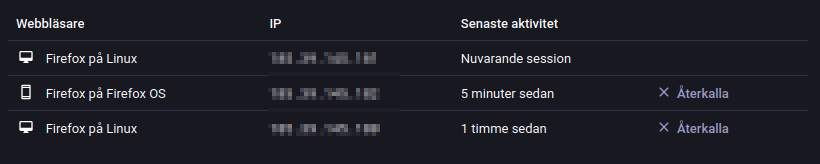
Thanks for the integration @abranson . I installed it and noticed that Mastodon think Sailfish browser is “Firefox on Firefox OS”. It’s probably not so good publicity for Sailfish.
You can check in Mastodon settings under Acount/Acount settings/Sessions/Browsers.
I think that’s more that we have to set the user-agent of the browser to things that pages will actually render properly with rather than worry about publicity…
Is it really necessary to recognize any Mastodon instance? It looks to me as if it would suffice to recognize the own Mastodon instance, which could be written in a configuration file

 This one sparks joy!