Just enjoy as much as possible!
3 Likes
Need to check the battery before start. I read in some past posts to check the battery level. Must be well charged.
No need to worry about that. That’s long solved.
3 Likes
Hi
today i received the phone. I’m going to set it up. There is an os update but it don’t install it. Why?
a already made account in jolla, google, dropbox and hotmail, but update don’t install. I get an error message. is there another way?
I received my C2 (second batch) four days ago.
It arrived with 5.0.0.55 installed and a note saying the “startup wizard” was already done.
I guess that is why the timezone is set to Helsinki. 
2 Likes
yes it s a shit phone with shit display…no card slot 
What type of card will you put in this slot? I have seen a place for a memory card. In the sim card tray.
Received my Jolla C2 last friday. Beautiful phone! Great to be back on the Sailfish boat!  (I daily drived the Jolla 1 for a few years in the past.)
I also can’t update to 5.0.0.55. Maybe it’s still for Early Access-users only?
5 Likes
Thank you very much. I’ve got my third Jolla, now C2 two days ago. I liked. The first was 17 th in the world from the publising year 11/2013, still working! Something is still missing.
1 Like
5.0.0.55 is for early access user only. You can find this information in the release post. But check the version on your phone (-> settings). It should be 5.0.0.55 already. In this case you can see a special effect: you get a notification for updating to the older 5.0.0.43. Don’t try it. It will not work and is of course not needed.
Happy days with this nice phone.
1 Like
Small fact about the external keyboard featured in C2 portrait video https://www.youtube.com/shorts/34cm4WwbntE
I have managed to buy exactly that one, a white-label HB199 Slim Folding Wireless Three Bluetooth Keyboard, Folding Keyboard, B .O.W,BOW
The keyboard is surprisingly easy to use and clicky, but there’s one thing that made me return it: I cannot exit vi :))
Meaning: there is no way to press ESC on sailfishOS with the variant I had.
Here’s my explanation, accompanied by a picture:
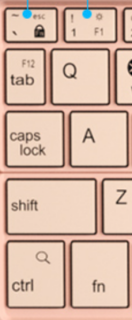
In this small factor layout, if you press 1, you get 1, and if you press Fn+1 you get F1. That works.
However, the target being android/iOS, there’s a method to switch to function lock that doesn’t enable F1 F2 etc but Brightness, Volume. So in that mode, pressing 1 changes brightness, pressing Fn+1 gets us 1.
Now, the switch for “Fn lock” should’ve (according to the manual) be Fn+Shift+`.
Unfortunately, the keyboard I have switches Fn lock with just Fn + `.
I say unfortunately, because that means that if you want to type Esc, you now have to use Fn+Shift+` (instead of Fn+`…)
Which is very important, because Fn is not set over the wire, but Shift is, so evdev receives “SHIFT DOWN” then “ESC DOWN”.
Which does not help quit vi on this OS 
(It is interesting that it does work correctly on my desktop archlinux, but I don’t know how to explain this)
1 Like
Vi is probably there the busybox version. Have you tried installing vim if that works any better?
Besides that, not sure how much we can do if it’s the keyboard that’s sending those specific events.
1 Like
For whatever it’s worth, tested on debian 12 and shift+esc is accepted and treated as esc in both vi and mc
edit: wonder if there is a way to modify a keymap for specific keyboard, like maybe using capslock for esc, three keys press for esc seems pretty bad even if it worked correctly
Did you try the old school ctrl+[ ?
2 Likes
Busybox vi, which is what vi runs on SFOS, doesn’t support :map macros unfortunately.
If you are willing to switch to vim instead, :imap <S-Tab> <Esc> maps Shift-Tab to Esc. that works at with my different model Bluetooth keyboard. For symmetry, nmap <S-Tab> i makes Shift-Tab switch between insert and normal mode. They work on PC too
2 Likes
Yup, vim is just the same.
Yes, I was wondering the same,.. but opted for return. (This, and the fact that it used microUSB while falsely advertising USB-C from where I bought made me decide that..)
Oh! That works! 
I was smarter when younger, I knew it would just extract 64 from the ascii code (91 is [, subtract 64 and gives 27, which is Esc). However I have the feeling that it won’t work in all situations.
Now that is creative, I will use that 
Thanks everyone for the answers, and I guess the smaller keyboard would’ve worked well with all these advices, it is as I said on the way to the seller, but I hope somebody else will use all these suggestions
6 Likes
Completed the final payment today after a short or long waiting since the pre-order. Hoping to get a daily driving C2 in 2~3 months!
1 Like
Fairly excited to get Jolla C2 on my hands today.
Pre-order (50€)
Final payment with sleeve and protector (223.09€)
Parcelforce customs charge (£56.93)
Zdhaitao forwarding fee (¥184.40)
Import duty (¥225.55)
Spent ¥3,127.34 in total on this device.
Nice and compact packaging box with note from Jolla Crew outside.
Phone is already in protective sleeve and screen protector sealed in box.
Worried about the empty battery issue so plugged in a charger first.
Battery is 95%. Booted up smoothly after entering security code 12345.
Switched language and went through the system guide. Impressive!
Phone is quite large in size and have a huge screen with mediocre resolution.
I expected it to look not so good but actually it’s somehow acceptable for me.
The theme is weird and dotted, making the resolution look even lower.
Auto brightness is very high, even higher than the highest manual setting.
I noticed a defect on the screen. A pixel or two shows always in green.
The camera takes plain photos. I even doubt it can scan those tiny Alipay QR codes.
Video recording is as expected not functional. Camera app crashes before starting rec.
Browser didn’t crash watching bilibili. Wi-Fi speed is slow, barely playing a 720P video.
Danmaku is at very low frame rate and videos stuck sometimes but not too often.
1080P streaming is a nightmare, perhaps not needed. Reminds me of old Atom netbooks.
I plugged in my China Mobile SIM cards, one from Sichuan and the other from Beijing.
Good news is 4G calling (VoLTE) seems to be working for the card chosen for Internet.
(Didn’t see any VoLTE signs though, only 4G mark on the status bar.)
At least I can make and receive calls at home, receive SMs and use mobile data for web.
Bad for the other card, no signal at all. Fine to use as a single-card standby phone maybe.
Also tested some media files. Confused to find no native music player.
Can watch local movies through album app, loudspeaker sounds crappy.
Can’t even play .mp3 files?! Says not supporting ‘audio/mpeg’ file type.
As asked before purchase, basic features are usable without logging into Jolla account.
Good to have some Chinese language options but sad to see no input methods.
I put Jolla C2 back in the case, in the box and into my drawer, and continue using my newly bought Android flagship.
Hope to use it as a daily driver someday in the future and log in my account then to activate that one-year Sailfish OS subscription.
For now it’s out of my consideration since the lately released Shadowverse: Worlds Beyond has an extraordinary system requirement for Android version and hardware specs…
Happy gaming and have a good day tomorrow!
2 Likes
There is “official” media player Media. It should be installed but you can install it from Jolla store anyway.
There is no one year subscription for C2 as you can see in Announcement section.