I created an icon of the HA tab in the SFOS launcher. After clicking on the icon, the login dialog is displayed directly in the Internet browser, and after logging in, the appearance is the same as in the webview of this or Android applications.
This version didn’t work very well for me. At first it logged in, but if I restart the app it loads until it says “signed in to home” and shows the loading circle and the app stops responding. I think (some times?) changing the network, for example turn off/on wlan let me login again.
I’m using only single https url for both internal and external connections and I have corresponding hostname binded to my local server ip in the router. I think this means also that in my case home state is not recognized correctly in the app if it’s following the url and not the connected ssid? Should I set both urls the same in the settings? I already tried the app with the option “Mark home on internal connection” turned off so that it doesn’t confuse things.
You should be able to leave the internal address empty and then it would use external only.
New version coming soon - I failed to find out how to use the Events Screen (I’ll continue investigating later), so I went with the cover for favorites.
The cover only supports two buttons, so now it will show the following:
- 1 favorite: name and play/pause button
- 2 favorites: same but 2x side by side
- 3 or more: One favorite with play/pause visible and an arrow button to cycle through them
The favorites only support lights for now, but I’ll add switches and scripts etc as well later.
… and because this takes the space of the settings button, those can now be accessed through Settings → Companion App (in the webview). That’s where I wanted it to begin with so no problem IMO 
Oh and notifications still take over the cover when they arrive - I think I’ll make a setting for this later, in case someone wants to disable that.
And finally, Helmsman now reads your default dashboard setting and shows that rather than the generic overview one on startup.
And here it is: Release Helmsman 0.2.6 · Pauligrinder/HomeAssistant · GitHub
8 Likes
Looks like there’s some major issue with external urls in this recent version. I’m on it and hopefully I’ll have a fixed version available soon…
[update] fixed release: Release Helmsman 0.2.7 · Pauligrinder/HomeAssistant · GitHub
… nah, didn’t fix it after all 
… ok. let’s hope this’ll do the trick. Release Helmsman 0.2.8 · Pauligrinder/HomeAssistant · GitHub
I still need to test it for real, but at least now when I turn wifi off it does the right thing.
Thank you for the update! I skipped the version 0.2.7 and tried directly the 0.2.8. I like the cover function to switch on/off lights, looking forward to use it for switches too. I could see sensors in HA too. Also settings in the menu feels correct place to me, although if you have problems to open the app/connect like I do, you cannot access them.
Sadly I still have the problem since the version 0.2.5 that the app doesn’t start again if once closed completely, it stays frozen and I’m shown kill app/wait options. Happened today on my tests every time using wlan, on mobile connection I was able to connect few times and then I was able to change to wlan on the fly. At the end it didn’t connect again and I had to go back to 0.24.
Will you provide this app on chum or openrepos? Would be a bit easier to install for more people than going to github every time.
@prkl see if this helps: Release Helmsman 0.2.9 · Pauligrinder/HomeAssistant · GitHub
seems to work at least most of the time in my testing, and the few times it got stuck, it worked again after killing it. Of course you should never have to do that, but at least it’s a step in the right direction.
Oh yeah and fyi: the situation happened because sensors were being initialized too early, before internal/external detection. I moved it to happen later, but my plan is to make a background daemon for it in a future version (which will also handle notifications etc)
And yeah, I’ll post it somewhere (Jolla store would be ideal but I don’t know how hard that would be), but I wanna get it a bit more stable etc first
2 Likes
I believe background daemons aren’t allowed in harbour, so you’d have to build a version without to publish there.
This seems to be working better! And I think I found the culprit; when I add cover widgets, the loading starts to fail. I can see freezing with three widgets, reducing it makes the startup more reliable. With only one widget it starts almost every time.
Good catch! it’s probably the same bug as with sensors. I’ll try to fix it asap.
New version with the fix for favorites:
And yeah, I know daemons aren’t allowed in harbour, so I’d do it the same way Situations does - the daemon isn’t included by default but can be installed from inside the app (which downloads the rpm and installs it).
2 Likes
The latest update fixed the freezing issue, thanks!
1 Like
Ha, I got the Events View to work too now. I really like how I made it look too. Now next step is to be able to add other kinds of devices there (still just lights for now).
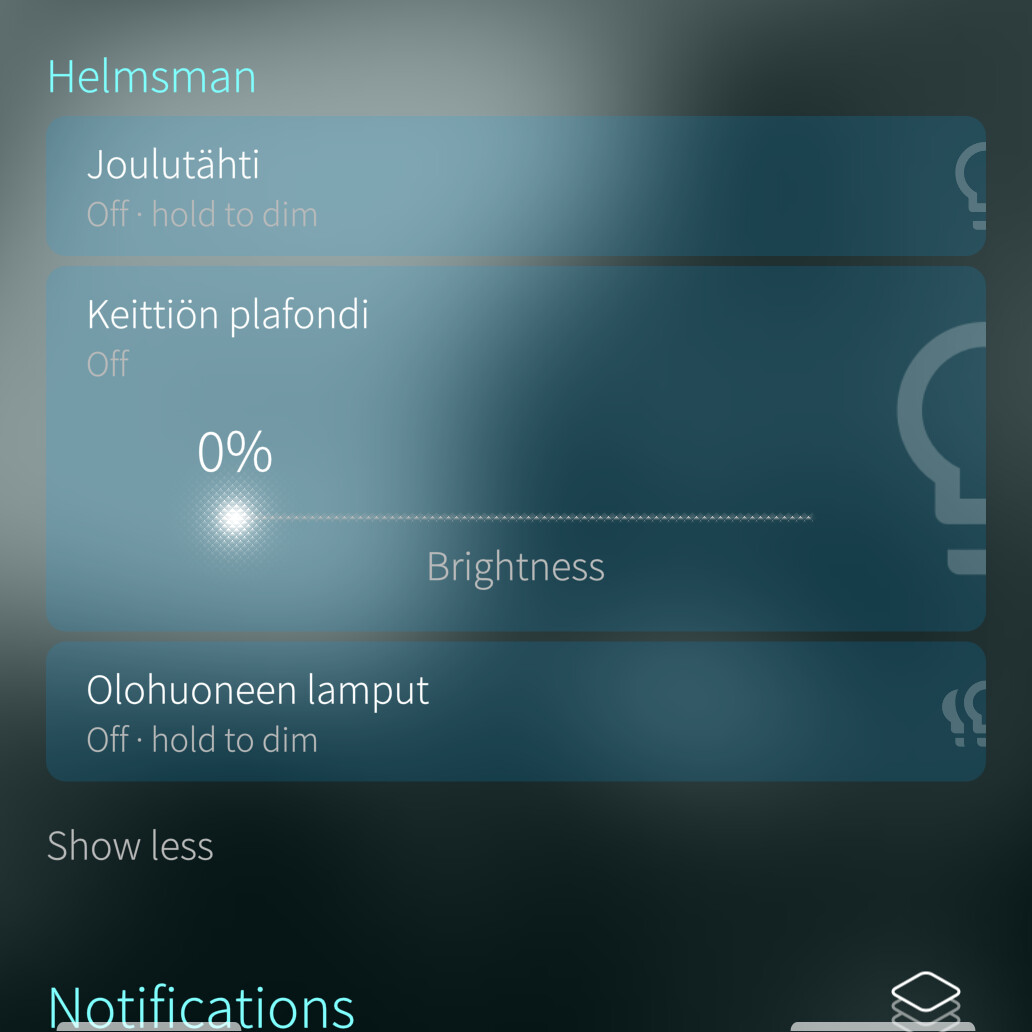
Here’s a version where you can check it out: Release Helmsman 0.2.11 · Pauligrinder/HomeAssistant · GitHub
After installing, go to the Sailfish Settings → Events View and enable Helmsman there. Then you can add lights to it from the Companion App settings. The selections are separate from the cover-favorites, so you can have some stuff on the cover and others in the events view
It might need a home screen restart (Settings → Sailfish Utilities → Restart home screen) to start working, and also the stuff only shows up in the events view when the app is running/backgrounded. I’ll check if it’s possible to make it work without the app running later, and of course the last resort is to have the aforementioned daemon handle it.
11 Likes
Thanks for this great app. One question: how can I stop it to acquire GPS everytime I start it? I cannot find any location sensor to disable in the Home Assistant settings.
1 Like
You open the Mobile App integration settings in Home-Assistant, and there under Diagnostics there’s a sensor named after your device, which shows something like Home/Away/etc. disable that, and then it shouldn’t get the location.
That’s also one thing I want to improve - it should work similar to Android, where it basically updates the location only when some other app requests it (or requests it if it’s been 30min+ without update). Also settings for when to update the location.
Disabling that sadly does not chang it, also the reload sensor config button in the settings doesn’t disable the location sensor on the settings page.
I also noticed an issue with it - when Helmsman is scanning location, it prevents other apps from getting faster updates. For example I was navigating using Pure Maps, and it only updated my location every 500m or so until I killed Helmsman.
I’m updating Helmsman so it only takes other apps’ fixes and if nothing happens it gets it once per configurable time period.
And I’m adding native sensor toggles as well.
New version soon.
… and here you go: Release Helmsman 0.2.13 · Pauligrinder/HomeAssistant · GitHub
now the sensors are more configurable and the location should be less battery intensive, since it mainly tries to use fixes from other stuff, as I said before.
Another new version for today: Release Helmsman 0.2.14 · Pauligrinder/HomeAssistant · GitHub
Now cover+events view also support switches/scripts/climate controls.
In the cover everything is just on/off (except scripts of course, which just run), but on the events view climate controls have mode/fan speed/vane controls and scripts show an extra confirmation with run/cancel to avoid accidental taps. And I also added temperature/color for lights where applicable
Haha… I just realized I forgot to add temperature to climate controls  Also the fan and vanes should have “auto” options. Oh well, there’s always a next version…
3 Likes
There’s a new version (well, many versions actually, I just haven’t posted here) with the improvements I mentioned earlier: Release Helmsman 0.2.20 · Pauligrinder/HomeAssistant · GitHub
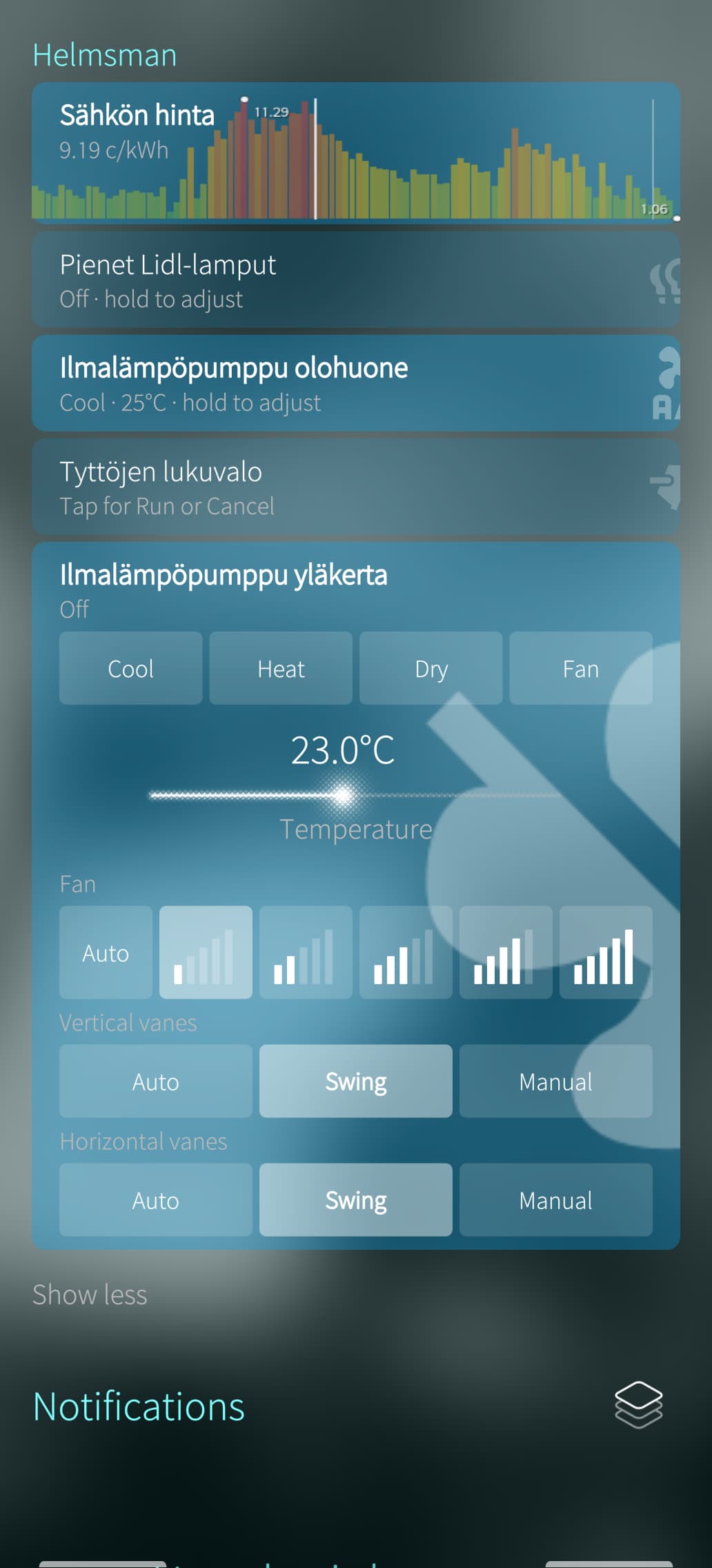
It’s now able to show sensors on the events view and cover → on the events view it also shows a 24h graph as background, with min/max values highlighted. It still needs some kind of y-axis timestamp display to be properly useful, but at least you can see roughly how something has developed during the day now
And it also can show graphs of data, for example in my case I’m showing electricity prices for today and tomorrow - this however requires the data to be formatted quite specifically like I have it, so I don’t know how useful it will be to anyone else. Here’s how it looks (opened climate control at the bottom, electricity graph at the top):
Location fetching is still a bit flaky. I don’t want it fetching locations all the time, but as it is now, it doesn’t really do it at all. So I’ll have to look into it some more…
Another thing I just started investigating is the possibility of rendering the dashboards natively. It’s a pretty big task, but I think I might be able to pull it off in small increments, and once it works, it will be a very significant upgrade. Also the dashboards are available as JSON from the Home-Assistant backend, so rendering them natively is definitely possible. Custom components will be a bit tough though…
5 Likes
Thanks for the update, it does not acquire location anymore all the time.
Regarding the native dashboard: there is so much possible in Home Assistant that a native dashboard is not perfectly possible I would say. But you should try to build the app optionally against the 153 browser packages from openrepos, the web application should work far better. And perhaps some sort of silica theme for the webview would be easier. Perhaps the app could inject some CSS?