Yes imo better create the file in etc, but your guide already does this?
nano /etc/systemd/system/home-swap-swap0.swap
Yes imo better create the file in etc, but your guide already does this?
nano /etc/systemd/system/home-swap-swap0.swap
I’ve corrected it before your confirm, thx!
This seems to work well on my X 10 II.
root@Xperia10II-DualSIM:/home/defaultuser
> swapon --show
NAME             TYPE       SIZE   USED PRIO
/dev/zram0       partition    4G 806.3M    5
/home/swap/swap0 file      1024M     0B   -2

root@Xperia10II-DualSIM:/home/defaultuser
> free -h
              total        used        free      shared  buff/cache   available
Mem:           3.5G        1.9G      527.6M       17.2M        1.1G        1.9G
Swap:          5.0G      806.2M        4.2G
Screenshot, 3 browsers open, one of them playing a video:
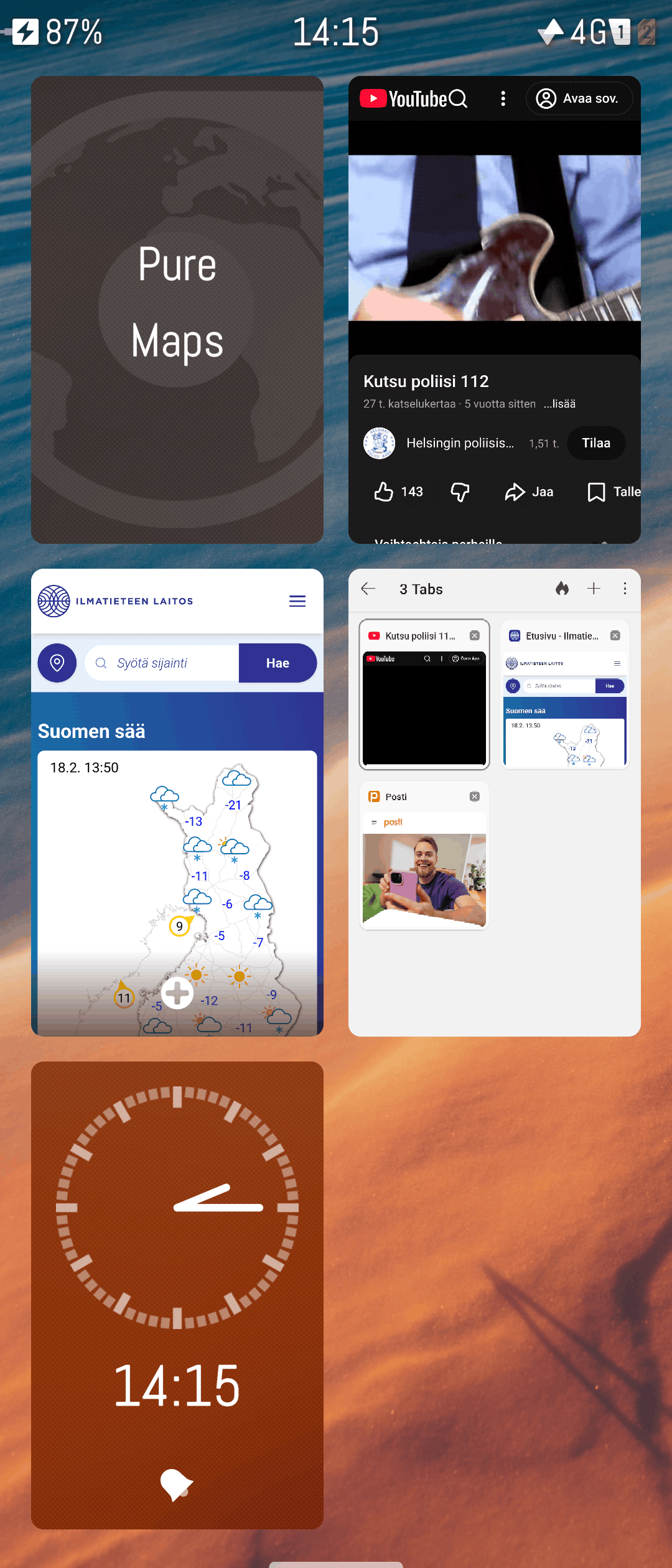
I can switch between windows all I want, no crashes.
The clear change in all 3 graphs is when you activated the optimizations discussed here?
AFAICS swap here does not differentiate between physical swap & zram?
@mive I think you mentioned physical swap being really slow on an encrypted partition?
OTOH it’s good to have swap encrypted.
Do you have comparative numbers on responsiveness, or at least anecdotal experience?
How much is physical swap even used in this scenario?
@RootGPT could you please explain 1 more time how it works that ZRAM can be 100% the size of physical RAM? I mean it’s still inside physical RAM. Is that the size before compression? Is the compression that good?
BTW, can we agree that this works equally well on at least Xperia X10 II and X10 III, if not all Xperias with 4GB of RAM?
PS:
I’d also love to hear critical voices, who think all this is not a good idea.
In practice it works like this: ZRAM can be as large as physical RAM because that number is only the VIRTUAL size of the compressed data. What actually goes into real RAM is the data after compression, so it takes up less space. It’s just an indicative value, not a real one. In fact, ZRAM can theoretically even exceed physical RAM, but that’s not a good idea — I’ll explain why in a moment.
Compression is actually very effective, because many memory pages compress extremely well. So with 1 GB of real RAM you can store 2–3 GB of compressed data, depending on the content.
I’ve always said not to exceed physical RAM because ZRAM still lives in symbiosis inside RAM. If you make it too large, you risk taking RAM away from apps just to store unnecessary compressed data, and you also force the CPU to work harder to compress/decompress everything (nothing is free in this world). In the end, you may actually make performance worse instead of better.
Purists will forgive me, but with the right swappiness, ZRAM=RAM, and a good compression algorithm, you could say the device behaves as if it had gained a solid 50% of extra real RAM.
I’ve just tested the updated implementation with swap located @home on my main device. Together with the Android13 update by the 5.0.0.73, I’m now pretty sure the X10III has @least 3 to 4 more years to go!
I hope so! Thx for your feedback!
I’ve been testing this out on an Xperia 10 II and it does indeed seem to prevent OOM crashes, but running more than 4-5 applications, especially if some are Android applications, is very slow. It looks like the RAM fills up pretty fast and then immediately has to start swapping. I’m sure this is to be expected considering the device is six years old and wasn’t the fastest when it came out either, but are there any further optimisations I could do? I noticed that ‘free -h’ says there’s only 3.5 GB of RAM and not 4 GB,so should the ZRAM file be 3.5 GB instead?
Mar 2026 from swap subsystem engineer: Debunking zswap and zram myths
tl;dr: If in doubt, prefer to use zswap. Only use zram if you have a highly specific reason to.
Although
It only really makes sense for extremely memory-constrained embedded systems, diskless setups, or cases with specific security requirements around keeping private data off persistent storage.
…which sort of does match our situation.
But I tested this on my previous X10 II (currently on III with stock config), and concluded it’s an exercise in futility, see Low memory, apps crashing - change zram settings or add swapfile? [4.x] - #57 by lkraav for the whole story.
(AFAICT this whole  is a duplicate “re-inventing the bicycle” work of
  but whatever.)
but running more than 4-5 applications, especially if some are Android applications, is very slow.
Yep, exactly. As memory stress increases, you will run into thrashing traps that will completely stop UI from responding to anything, for potentially several minutes at a time.
Jolla 2 with 12 GB RAM is the only real workaround for those needing to daily-drive SFOS with AAS apps at a professional clip.
On X10 III (6 GB) I still take care to manually close apps here and there to try avoid running into swap lag. Browser memory use is the worst, you literally cannot have it running in the background (auto-kill is often too late), so I close it manually after every browse session. Fortunately launch is fairly quick for this to work, but it’s still an annoying papercut.
As of SFOS 5.0, I don’t think Jolla has succeeded in aligning SFOS low-memory killer with AAS’ very well. Or maybe they have to the max available, but it just still doesn’t work out. Otherwise I think I wouldn’t feel like manually closing apps is often working out better than simply letting lmk take care of it.
If it were up to me, opening up a swap area for ZRAM is always better than the ZRAM thing.
…the apps you use, and that the X10II has only 4GB RAM.
No, it says there’s 3.5G of RAM which I’m guessing (read busybox documentation for something better) means GiB, not GB. That difference is about half of that, the rest is probably reserved. For what, I do not know.
ZRAM does not exclude SWAP; you can create both, and it’s the best configuration to use.
Honestly, ZRAM and a SWAP FILE have made my 10 III fully usable in 2026. Obviously ZRAM doesn’t work miracles — it’s software that helps the hardware — but if the hardware is very limited, we can’t expect it to perform like a Galaxy S26.
If you use more than 3 or 4 apps at the same time (especially Android apps) on a six‑year‑old phone, what can you realistically expect? ZRAM and SWAP do help, and that’s undeniable!
Nobody’s disputing this: SFOS ships a default ZRAM config out of the box.
Only discussion is about whether there’s some significantly more optimal configuration available that improves long-uptime UX.
“Significantly” being the key word: is it worth all the fiddling to only get minor improvements that also might be subjective, sometimes illusionary, and within measurement error-range?
OTOH if more people experimenting helps reveal any important details that Jolla have missed, I’m all for it 
Based on my testing with the 10 III, I’d say yes, with my configuration the smartphone works really better.
Different concepts solving different problems.
Did anyone test it with 5.1?
After update, the configuration is inactive. The files are still there, so I did the part
systemctl daemon-reload
systemctl enable zram-override.service
systemctl start zram-override.service
And now it hangs since a few minutes at the last command.
Anyone an idea what to do now?
Problem solved. I was too impatient.
So just run these commands and the problem will be solved? I haven’t upgraded to 5.1 yet.
yes, only this three commands for reactivating zram after update.
The swapfile was still there, but also you have to reactivate it after update.
And, for certainly, how can you reactivate the swapfile? So the guide Is complete…