If I understand the described problem correctly - than I can say: After a few days of testing: The Problem seems to be gone with the update 5.0.0.73.
(I had it on a daily base before)
2 Likes
Can’t say it’s entirely fixed - although perhaps it just unearthed a different bug - because in my case I’ve noticed that my C2 no longer automatically (re)connects to WiFi once it (re)enters WiFi range. When I open the ‘connect to WLAN’ dialog, it shows all available networks as empty icons. I have to turn WLAN off and on again for it to reconnect. This seems to happen every time and even half an hour later it’s still stuck if you don’t manually turn WLAN off and on again.
All of the WiFi networks I connect to happen to be mesh networks.
Good to hear the problem is being resolved for some people. Not for me–I’ve just got better at noticing the warning signs. For the last month, my C2 has lasted about 6 days with care, checking WLAN regularly and toggling it off and on when needed. On the 6th or 7th day, it fails to connect, heats up, battery drops, and doesn’t recover unless I shut it down, wait, charge it and then start it up.
I shouldn’t think this regular overheating is doing it any good. I hope the C2 will last until the problem is completely resolved, or the new Jolla phone arrives.
My Xperia 10–II often ran for 30 days or more without needing to be restarted. The C2 is a lovely phone, I like the screen size better and it’s good to have a newer Android version, but I wish I could rely on it.
2 Likes
Sadly for me, the latest OS update (5.0.0.73) Tampella has reintroduced the connectivity issue big time on my C2. 
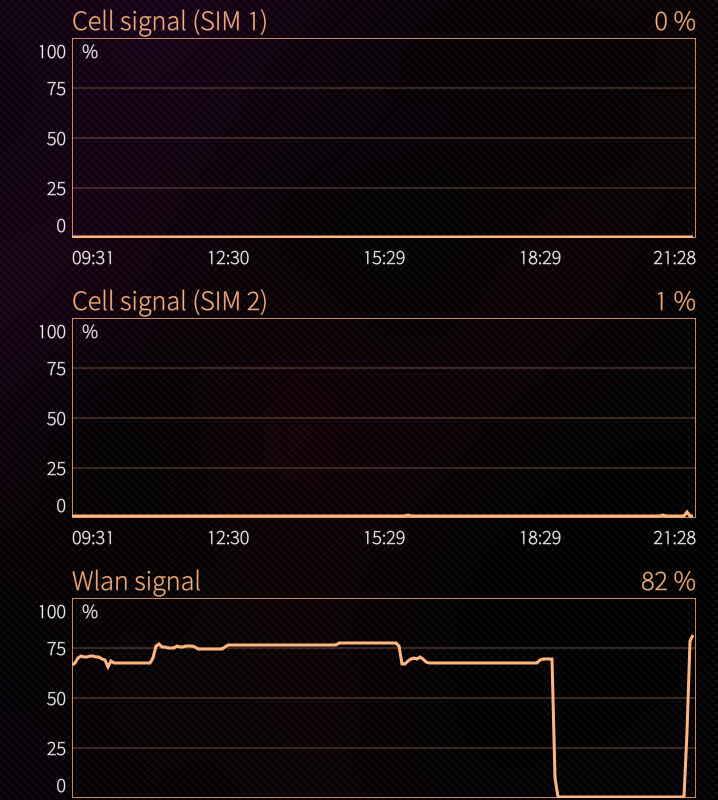
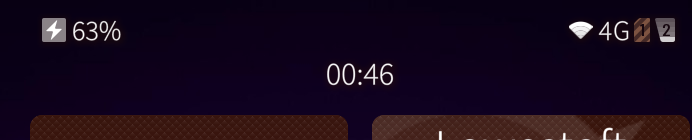
There’s also a new issue that has appeared. I my signal strength won’t show any more than 1 bar (1% in Sysmon).
I’ve done the usual:
SFUtilities → Restart Network Subsystem
Removed the Sim for 20 mins
Tried the Sim in both slots and done a restart numerous time from top menu including a complete power off for 20 mins.
But always get the same result.
Any ideas?
“Can’t say it’s entirely fixed - although perhaps it just unearthed a different bug - because in my case I’ve noticed that my C2 no longer automatically (re)connects to WiFi once it (re)enters WiFi range. When I open the ‘connect to WLAN’ dialog, it shows all available networks as empty icons. I have to turn WLAN off and on again for it to reconnect. This seems to happen every time and even half an hour later it’s still stuck if you don’t manually turn WLAN off and on again.
All of the WiFi networks I connect to happen to be mesh networks.”
My C2 is on .72 and does exactly this (did also on previous versions).
mine shows the one where i just left as empty, and the list seems to be frozen, until you turn it off and on again
Slightly offtopic: But where is the screenshot from? Sysmon in Open Repos is not available for the C2, is there an up to date version somewhere?
I use this Version on my C2:
harbour-systemmonitor-0.6-54.aarch64.rpm
from:
1 Like
Thank you! Got it now.
1 Like
Ok, my C2 (.72) is at this moment in a no WLAN communication situation, despite being connected to a WLAN, said WLAN having Net reach and having restarted network services through the utilities. Other devices can communicate to the Net through that WLAN without issue. The C2 can use LTE mobile connection without issue.
What happened that might explain this is that power went down for at least 1h30m earlier in the morning. WLAN connection was not automatically established when power came up and WLAN was available again, icon showed a star. Had to press the icon to stop and start connection and it joined the WLAN, just no communication at all.
I can keep the C2 like this if you want me to try any commands.
So, I had it one time again on saturday. But that is quite ok for me.
Yesterday my C2 appeared to be connected to the work WLAN as usual; I’d received a WhatsApp message. But when I tried to start an app, the app failed several times. Firefox also couldn’t open but helpfully said it would start when AppSupport had started. Tried to start AppSupport–which had been running earlier in the day–and several times, it showed Starting up until Stop appeared, then immediately again Starting up. Restarting the network subsystem didn’t help. The phone was warm, battery hadn’t dropped significantly. I shut it down, waited, then started it up carefully as usual. It connected and everything worked as expected.
I hadn’t see AppSupport cycling like that before. Perhaps it’s significant?
1 Like
That’s another bug. Known. Should be fixed in 5.0.0.72 IIRC?
What version are you on?
I’m on 5.0.0.72…installed that on 23 Nov 2025.
Please use thread for that bug for further reports.
The screenshots are from the status bar of the C2 and System Monitor.
The mobile network signal is constantly at 1%, sometimes it goes up to 2 or 3%.
I don’t have any call quality issues, that’s why I think it’s a bug introduced in the last SailfishOS update.
On top of this the celular to WiFi switching is as bad as it ever was previously, more often than not requiring me to shut down the phone for a few minutes.
I’ve had the App Support cycling issue a few times too.