Tested on a Jolla Phone 2026, Sailfish OS 5.2.0.22 (aarch64).
TL;DR
I wanted a work VPN (Palo Alto GlobalProtect, through OpenConnect) and a home VPN (OpenVPN with a TOTP one-time password) connected at the same time, each routing only its own networks, with IPv6, from the native Settings → VPN UI. Along the way I found and fixed a series of connman bugs and added a few options. Everything is now working on my phone and proposed upstream:
| Pull request | Content |
|---|---|
| sailfishos/connman#159 | OpenConnect GlobalProtect authentication, reconnect after suspend, split routes pushed by the gateway |
| sailfishos/connman#160 | Several VPNs at once, SplitRouting saved, OpenVPN IPv6, one-time passwords, a connmand crash, IPv6 default route |
| sailfishos/connman#161 VPN.LocalNetworks | Wi-Fi networks on which a VPN is not usable (e.g. the home VPN on the home Wi-Fi) |
| sailfishos/connman#162 KeepVPNOnTransportChange | Keep the VPN when moving to another network, no new login |
A companion Patchmanager patch adds the matching UI (Settings is not open source, so it cannot be a pull request).
1. What was broken
OpenConnect / GlobalProtect (#159)
- GlobalProtect could not log in from the native UI. The built-in authentication of connman-vpnd ignored the protocol: it POSTed AnyConnect-style to
/gatewayand got 404. →openconnect_set_protocol()is now called before obtaining the cookie. - The tunnel was lost after suspend. openconnect reconnects by itself (
attempt-reconnect,reconnect), but connman treated these as a disconnect: tunnel gone, orphaned openconnect process, UI stuck on Disconnecting…. - Empty password sent: GlobalProtect names its field
passwd, onlypassword*was filled… - …and the rejected (empty) credentials were resubmitted ~50 times in a loop, which can lock an account. → at most 3 login forms, then the user is asked again.
- Split routes pushed by the gateway were never installed. connman-vpnd only signalled routes that have a gateway; OpenConnect split routes (
CISCO_SPLIT_INC_*) have none. Result: either everything went through the tunnel (Internet lost when the gateway does not allow it) or nothing of the company network was reachable. CISCO_SPLIT_INC_n_MASKLENwas taken for_MASK: IPv4 netmasks became16,32…
Several VPNs, OpenVPN, IPv6, OTP (#160)
SplitRoutingwas not saved: after a reboot a split VPN silently became a full tunnel again.- Only one VPN at a time. Connecting a VPN from the UI sets its AutoConnect, and connman then disconnected every other VPN. → new
main.confoptionSingleAutoConnectVPN(defaulttrue= unchanged). - OpenVPN ignored IPv6 pushed by the server (
server-ipv6,route-ipv6,dhcp-option DNS6), and the tun interface had IPv6 disabled. - One-time passwords were replayed. With
auth-nocache(TOTP), the agent stored the code and replayed it after any reconnection: endless Connecting… / Connection failed. → withauth-nocachethe code is never stored nor replayed, the username is remembered and pre-filled, the field is labelled “One-time password”. - connmand crashed (SIGSEGV) as soon as an IPv6 VPN came up: a NULL destination address of a point-to-point tun was dereferenced in
get_interface_addresses()(found with gdb on the phone). - A split VPN with IPv6 still got two IPv6 default routes on the tunnel (all IPv6 Internet went home).

2. New options
Several VPNs connected together — SingleAutoConnectVPN (#160)
/etc/connman/main.conf.d/30-multi-vpn.conf:
[General]
SingleAutoConnectVPN = false
Then every VPN can be turned on from Settings → VPN independently. Make sure each VPN is a split tunnel (VPN → Edit → Advanced → Use as default route off), otherwise only one can own the default route.
“Local networks” — VPN.LocalNetworks (#161)
A per-VPN list of Wi-Fi networks on which that VPN is not usable.
- Typical use: the home VPN on the home Wi-Fi (useless there, and it usually cannot even connect: most home routers do not hairpin NAT).
- Format:
SSIDorSSID|DHCP domain, comma separated, e.g.home-wifi|home.lan. With a domain, a foreign Wi-Fi that happens to have the same name does not match. - On a listed network:
- the VPN is not auto connected;
- turning it on is refused (from the UI or D-Bus);
- if it was connected, it is disconnected when the phone joins that network.
- When the phone leaves the network, the VPN is auto connected again as usual.
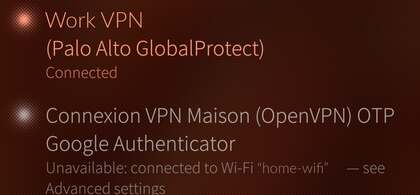
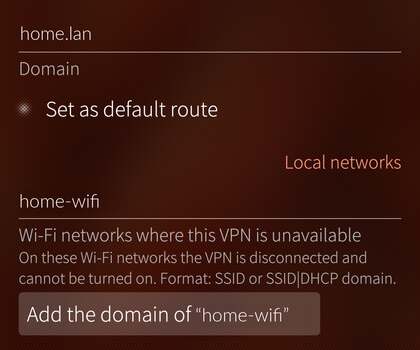
With the UI patch: VPN → Edit → Advanced → Local networks, with a button Add “current Wi-Fi” (adds SSID|domain). In the VPN list the VPN is greyed out with “Unavailable: connected to Wi-Fi “home-wifi” — see Advanced settings”; tapping it opens its settings.
Without the UI patch it can be set over D-Bus (as root or the privileged group):
gdbus call --system --dest net.connman.vpn \
  --object-path /net/connman/vpn/connection/<id> \
  --method net.connman.vpn.Connection.SetProperty VPN.LocalNetworks "<'home-wifi|home.lan'>"
Keep the VPN when changing network — KeepVPNOnTransportChange (#162)
[General]
KeepVPNOnTransportChange = true
Moving from one Wi-Fi to another (or a hotspot) used to drop the VPN at once — twice, by two different parts of connman — and the user had to log in again (password + MFA). With this option:
- the VPN is kept up to 60 s without network;
- when a new network comes up, the route to the VPN server is moved to it and the client reconnects by itself: OpenConnect reuses its session cookie, no prompt, no MFA;
- without a new network after 60 s, the VPN is disconnected as before.
OpenVPN with a one-time password will still ask for a new code (the server would need auth-gen-token to avoid it).
(Screenshots: phone in English; SSID, domain, server address, username and certificate file names replaced or blurred.)
3. UI patch (Patchmanager): VPN and Wi-Fi settings improvements
- VPN advanced settings: Local networks section (field, help text, Add “current Wi-Fi” / Add the domain of “…” button).
- VPN list: Unavailable: connected to Wi-Fi “…” — see Advanced settings, greyed out, tap opens the settings.
- VPN credentials dialog: One-time password label and numeric keyboard for
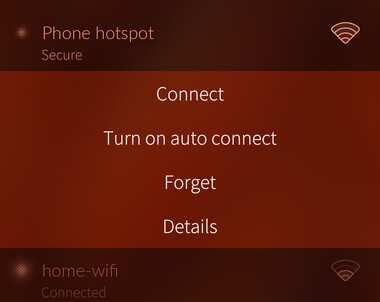
auth-nocacheOpenVPN profiles. - Wi-Fi settings: a tap on a saved network connects to it (it used to silently toggle its auto connect); auto connect moved to the long-press menu.
- English and French (other languages welcome).
4. Tips and limitations
- OTP asked again right after a network change: wait for the next code; the same code is refused twice by the server (by design of TOTP
DISALLOW_REUSE). - Samsung phones turn their hotspot off after ~10 min without client: the Wi-Fi then looks “out of range”.
- A Sailfish OS update replaces connman and the settings files: reinstall the builds / re-apply the patch until these changes are merged.
- Building: Sailfish SDK 3.13 (
sfdk), target 5.2.0.22 aarch64,sfdk build --no-check(one unit test fails only inside the scratchbox, unrelated).
5. How it was tested
On the phone, with both VPNs, on the home Wi-Fi and on a phone hotspot: connect from the UI in both orders, disconnect one (the other stays), routes and DNS of each side (IPv4 and IPv6), Internet through Wi-Fi, 10 min deep suspend, hotspot loss/return, moving between home Wi-Fi and hotspot (home VPN cut and restored automatically, work VPN kept without login — the gateway log shows no new authentication).
Feedback and testing on other devices are very welcome.