Yeah, the watch support was done pretty much blind with help from @abranson. And Situations has gone through some refactorings that might have also broken it. Anyway, if it is still possible after renamings (or whatever was changed), I could perhaps try to update the plugin?
1 Like
Patch might be the reason? Situations asks for the step count via dbus and uses that as the maximum value.
With the dbus command it works. I send only this: string:‘CurrentStep’ variant:uint32:11
And here all datas from Meego.MainVolume2:
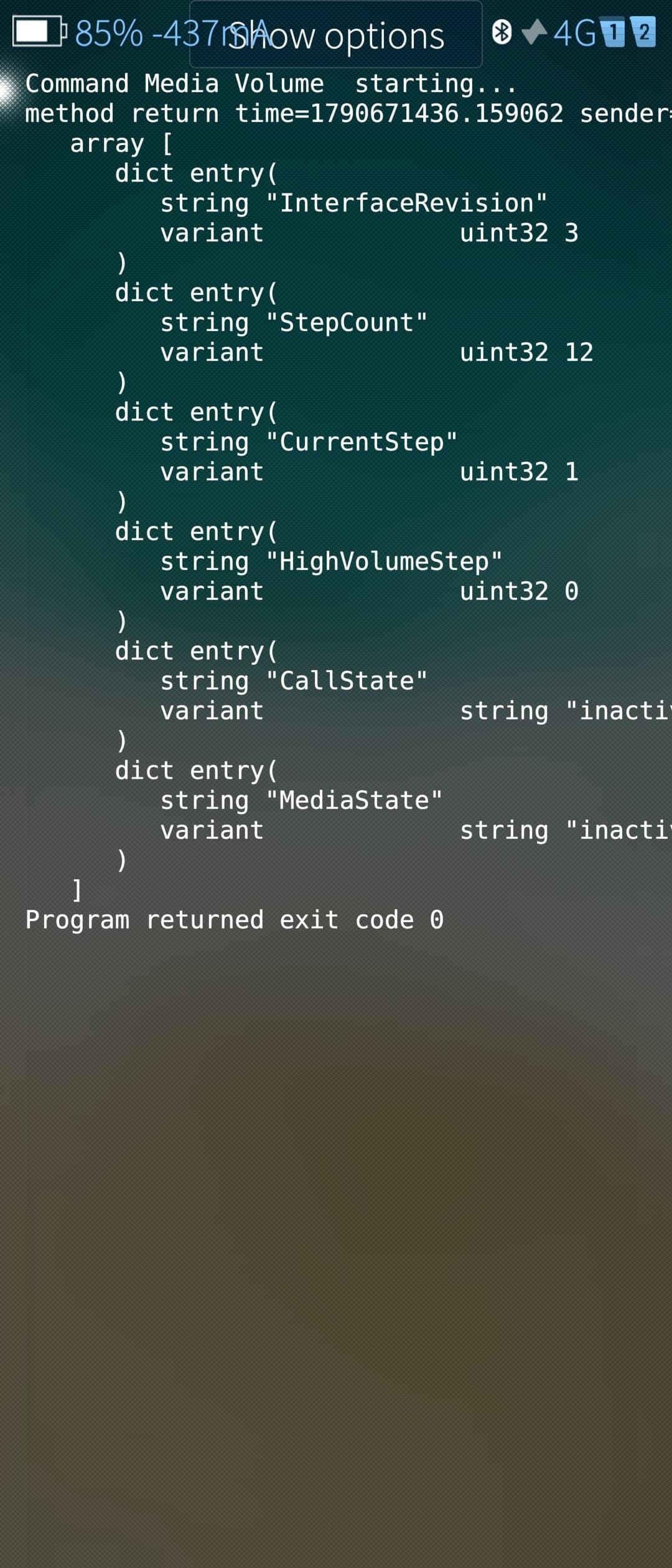
Maybe you send a other string per dbus or not with user/100000?
The patch change only the qml steps and not the dbus steps.
I saw 12 at stepcount and so 12 is the highes value and its not changed I use the media volume slider.
1 Like
Thank you so much!!! Ill try and report back later.
1 Like
Yet another update at the same location. This time the “play” button on main situation list can be toggled between timed & automatic mode with a long press. Otherwise the state remains the same - i.e. if you want to activate a situation with a timeout, first press the button to activate it and then long press to set a timeout. Or if you want to keep it disabled for that time, just leave the first step out. Is that sufficient?
At the same time had to change the start up sequence of the application a bit → there is a short period of “empty” screen showing before data is fetched from the background process. This is because Silica apparently had problems with navigation if the main view wasn’t initialized at start. So now it is initialized to an empty situations list first. And as a result one can navigate away from the timeout dialog opened via the main list.
2 Likes
I think I use the same command but of course it might be root process that does it - not sure if that has anything to do with it. Could you try uninstalling the background service and try without it (the service process then runs as a normal user)?
I tested it without my car and the media volume function works with the root daemon (without unistall). I make the phone silent (media volume) and start the situation car with the internet radio and it starts with max volume. Now I am a little bit confused. I will test it in the afternoon with my car. Maybe the reboot yesterday solved this and I had not test it aggain because I deleted the plugin and test the dbus command in the morning. Please do not search I will give you tomorrow a feedback… Sorry
1 Like
Sounds good and more intuitive. For some reason installing it gives me problem while installing error and can’t test that actually.
Yesterday I tested the media volume function again and it works. But after some secounds the volume go down. I think its not a situations problem. Maybe the started apps “Blitzer.de” and “DeadBeefSilica” make this trouble. I will search and share the results.
First of thanks that this great app exists and is fitting my needs for years now.
There was recently added a new feature to toggle default VPN from top menu. Is it possible to automate this function? It would be nice to connect to my home VPN as soon as I leave Wifi and turn it off when I am back at home.
That’s easy. Just create a home WiFi trigger which switches VPN..
Ok, that’s weird. Are you sure you tried installing the correct architecture package? Anyone else with similar problems?
Yeah, the vpn plugin for Situations was just recently added and currently it is only available in a package installed from here. But I suppose that should do it as @filip.k suggests.
Tried that and it connects to vpn when I disconnect wlan, but when I reconnect wlan vpn stays connected.
Thanks, apparently using the same connection that vpn connects over as a condition is problematic. Or something like that. I’ll see if something can be done about it.
After update to the Alpha release 324, the new VPN function is available, thanks for the hint. But how can I disable the VPN? Bluetooth function for example can be toggled by clicking on the symbol, but this is not possible for VPN function. Do I miss something?
Situations are stateful so that when a situation starts it could for example turn on vpn. And when that situation ends, it automatically turns vpn off again. But you are right that is should also be possible to turn off vpn when a situation starts - for it to turn on back again when that situation ends. So I perhaps need to add some “off” option to the Situations vpn list. So another update coming at some point…
1 Like
Okay, tested again and it works. But found a bug in detail: When VPN is trying to connect, but not connected (VPN icon blinks), the action is not able to turn off the VPN.
So in my case, if mobile connection is unstable and but in that state get connected to wifi (where VPN should turn off), the action is unable to disable the VPN.
One question for my understanding. Are all actions stateful?
So a question for my understanding. Example: Volume is 10 initially, then a situation changes Volume to 50 and following situation changes it to 50. Is it sure the volume ends up as 50? Can there be some edge cases where it Volume ends with 10? I think I recognized this seldom, bot not able to reproduce it.
Ok, I think I got it. The vpn model of Situations was updated based on vpn state, but it actually just sets the AutoConnect property to tell the system which vpn should connect. And this mismatch was causing problems when WiFi is disconnected. Perhaps also while vpn was trying to connect. Please try again with the new packages (note: updated URL).
Interesting question is, should Situations vpn condition be active when vpn is selected but is not connected. Then again, the same can happen with action also, so basically current plugin is just following/toggling the setting of what is selected as vpn, not whether it is actually active or not.
Anyway, as mentioned, updated packages are here. I believe it should be, for now, hopefully the last change before uploading to Harbour review (and new Qt was also released, so Android side can probably be updated as well), so build number went up also.
Most are. On Features page actions have the text “Action remembers previous state” (stateful) or “Action runs once” (not stateful). And when selecting “What” in situations, those non-stateful action icons show a small icon badge on upper right corner as well. Of course there might be bugs - one which I may have just recently fixed, so would appreciate some concrete recent example where this does not work.
I used aarch64 for 10 III. Arm version on XA2 installed normally. Only difference that came to my mind is that 10 III is at 5.0 and XA2 is 5.1.
Tested setting timer with long press on XA2, but never got it working. Tried holding button several seconds, but never got timer screen. Even rebooted phone to be sure.