i have been encountering this ‘bug’ (bad multi-touch calibration) for at least 10 years. it affects all devices, and the place to fix it is probably evdev itself, or the evdev bindings in the qt touch libs.
whether it’s in evdev, libhybris, or libqevdevtouch, it’s not likely to be something that any devs at jolla wrote or touched, and quite possibly will never be fixed.
i understand you not wanting to add a setting that is a workaround for a bug that isn’t yours, but i also reaallly dont wanna maintain a fork OR learn how to use the space key.
if you mean you’ve never had this issue on android phone, perhaps remember that google is a four trillion dollar company, that the hardware and firmware for every component in every phone was designed specifically to work with their software at all levels, and that sailfish is just a fancy hat on an android body. honestly, it’s strange that any of the hardware works as well as it does over libhybris and the other android translation libs.
also, i suspect that jolla already does not care even the tiniest bit about this bug. it’s obscure, low-level, and impacts relatively few users in a way that they notice. it’s been here since the very beginning.
they care even less about a workaround in an unsupported 3rd party keyboard.
if you are worried that users will stop clamoring for the fix if they don’t see the bug, you should actually REVERT your existing workaround that hides the bug in the first place. you should want users to see invalid swipes so that they report the touch issue to jolla.
Jolla releases their own phone too. So the software should at least work good on their own phone.
A lot people complained to me about the wrong input bug, not knowing that it’s a Sailfish OS bug and not my keyboard bug.
People then realize why their keyboard kept changing the language every time if they have more than 1 stock keyboard.
The issue is much broader. Just because you haven’t encountered, doesn’t mean it’s not widespread.
You can’t even properly draw on the screen if you want to do that either.
Anyways, feel free to fork it. That’s one of the reasons why it’s opensource.
the difference being, of course, that they are merely putting together parts manufactured for android phones in an industry designed from the ground up to serve the corporate duopoly alphabet&apple.
its fair to describe the JP2 as android hardware, executing proprietary android firmware, running an android kernel, with android modules, and libhybris+sfos delicately layered on top and wrapped in an orange case.
im not saying that they shouldn’t fix their bugs, or that they should get a free pass to do whatever they like…merely saying that this very well might be a bug they cant or wont fix ever, and your current workaround is suboptimal and could be improved.
thanks again for taking the time and energy to make this port, and to do battle with strangers on the internet! ill drop this forever now
Hey guys. I got my Jolla 2026 yeterday after some adventure with the italian ups.
Anyway, i,ve tried sice yesterday afternoon to enable futo keyboard but i’m not sure if i’m totaly blind, doing somethig wrong or encountered a bug.:)) So i can’t find a toggle to switch from the default keyboard to Futo.
Hi… I have tried everything (I believe… ) trying to enable Futo keyboard…
But no matter what I do, nothing changes on the keyboard…
what am I missing ???
Thanks in advance for input..
(2 days old JollaPhone 2026 - sailfish os 5.2.0.22)
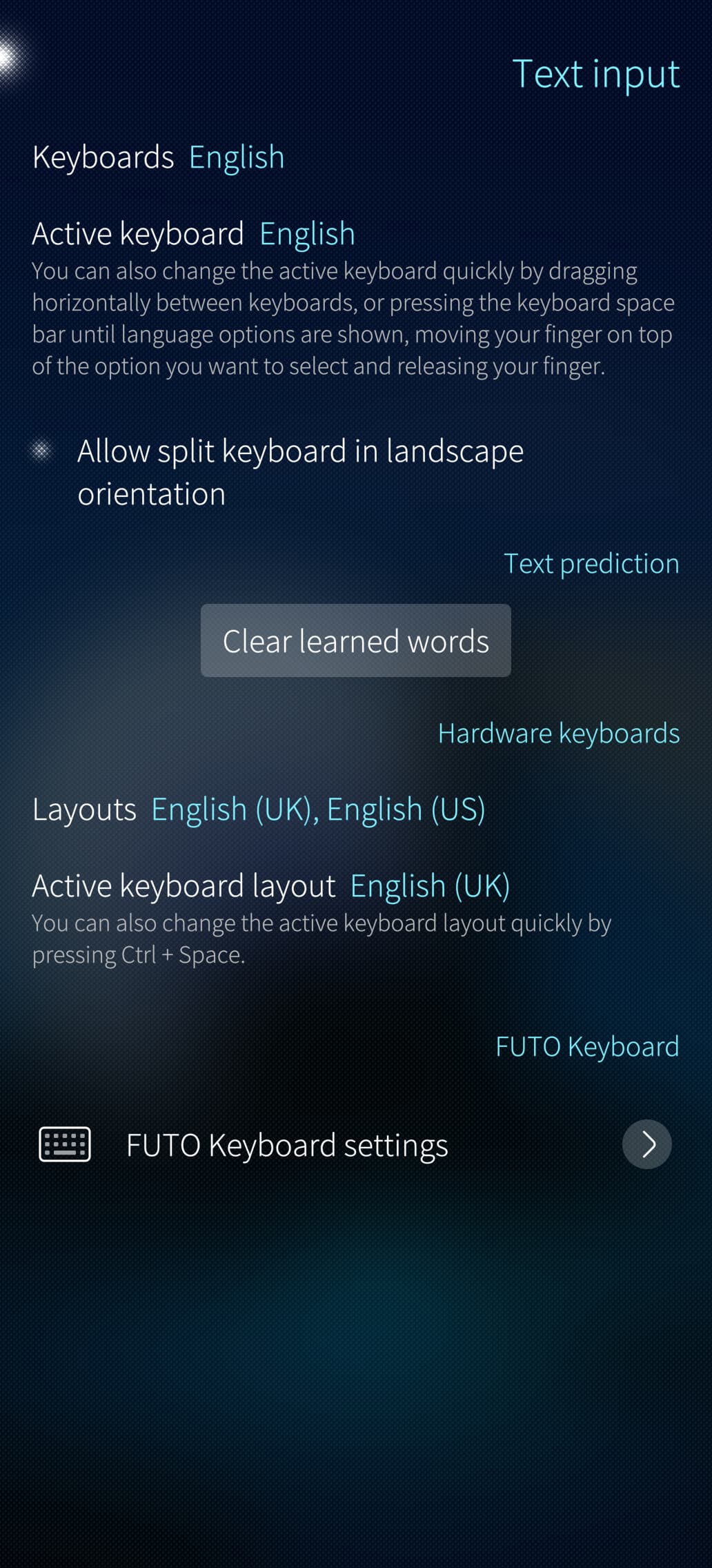
Hi I was just in the same situation! you gotta go into Settings > System Tab > Text Input > and here you gotta press on Keyboards: English.
It is in the list of languages is if it were itself a language. So scroll down between Francias and Italiano - there it is. a bit confusing but it works. then select FUTO and deselect English (if you want only the FUTO keyboard).
tysm for this keyboard. i was just looking as to how to implement moving the curser by swiping the space bar and this keyboard has it natively. it works like a charm
I am still waiting for my phone and have no experience with Sailfish at all, but I would like to ask if it would be possible to get FUTO with Japanese input , or any other keyboard, also onto the Commodore Callback 8020. I have to write in Japanese most of the time and wanted to make the Callback my main phone.
Create issue on Github, Fork out of main branch, Use AI to make fix for you, Test it, Create pull request - And you will open the door for people like you into better UX. This is the OS we build mostly ourselves. If some one from developers have free time - it’s common experience to get such update you requested in few days - until a week. Never had such experience with Windows or Android.
I have mentioned that asian community grows dramatically.



 I did the same.