My proposal is to use the LED on the Inari Blue TOH for notifications. If you receive a message (in a bottle), the Inari Blue TOH LED will turn on and pulse. This is useful for people who lay their Jolla phone on the table with the display facing down, so you can see when notifications are waiting. Perhaps the pulsing speed or blinking pattern could be programmable.
Added 27.08.2026: A first working shellscript which turn on the Inari Blue TOH-LED on missed calls, jump here.
Does anyone here still know which command the new Inari Blue button in the top bar uses to switch the Jolla logo’s fading light on and off on the Inari Blue TOH (dbus command, binary, etc.)?
According to /usr/share/jolla-settings/pages/toh/EnableSwitch.qml, it starts / stops (KillUnit) the user-level systemd service for jolla-csd-tohd.service which is managing the exec /usr/libexec/csd/toh-memory passed with --track to it.
Top menu entry located at /usr/share/jolla-settings/entries/toh.json
Ok, so we can start and stop the light on console with:
Added this on 27.08.2026:
So I’ll research how to read out when a new message arrives, and then turn the logo on and off. Maybe someone with more experience, who’s faster than me, could paste his solution here (shell script, etc.).
Other idea is to use Situations- or Automagic-App for this.
Addendum: When I turn on the light using the Top-Menu Button and then turn it off using a console command, the button stays on. After the first use of the console command, the button can be changed, but it no longer turns the light on or off. This issue needs to be investigated.
Addendum: When I turn on the light using the Top-Menu Button and then turn it off using a console command, the button stays on. After the first use of the console command, the button can be changed, but it no longer turns the light on or off. This issue needs to be investigated.
[/quote]
You should put into a dedicated bug report, else it will not be seen.
–and now a question to the forum SW: why is this quote not formatted as quote?
i personally like to have this for missed calls only. for sure best would be configurable solution from @Jolla but as there is “only” 10k toh now i dont have a hope for that… they may start to produce this TOH in more colors for all customers anyway
otherwise periodically check commhistory-tool or directly /home/defaultuser/.local/share/commhistory/commhistory.db and then control toh led…
Are we any further i.e.knowing how to assess the values for the LED perhaps with a simple bash script. I assume it’s just a simple LED and no multi-color one. However some tweaking of the blinking should be doable. In the old days with JP1, Kimmo Lindholm’s app „I2C Tool” was able to address the old JP1 THOs. Could his software (cp. Openrepos.net) be reused for the new Jolla?
This is a first version of a shell script with help of GPT-5.6_Luna that turns on the TOH Inari Blue LED when at least one missed call is present and turns it off when the notification is removed.
Ideas for features that could be added to this script in the future:
Check whether the TOH Inari Blue Back Cover is attached and take further action only if it is.
Check whether the Jolla Phone is lying on a table with the display facing down, and turn on the LED only in that situation.
Use notifications for other things, such as SMS messages or emails, or limit the script to only one type of notification.
And, as always, use it at your own risk.
#!/bin/sh

DB="$HOME/.local/share/commhistory/commhistory.db"
STATE="$HOME/.cache/commhistory-last-missed-id"
LEDSTATE="$HOME/.cache/commhistory-led-state"
WATCHDIR="$(dirname "$DB")"

SERVICE="jolla-csd-tohd.service"

# Check for required programs
if ! command -v sqlite3 >/dev/null 2>&1; then
    echo "Error: sqlite3 was not found." >&2
    exit 1
fi

if ! command -v inotifywait >/dev/null 2>&1; then
    echo "Error: inotifywait was not found." >&2
    exit 1
fi

if ! command -v systemctl >/dev/null 2>&1; then
    echo "Error: systemctl was not found." >&2
    exit 1
fi

if [ ! -f "$DB" ]; then
    echo "Error: database not found:"
    echo "$DB" >&2
    exit 1
fi

mkdir -p "$(dirname "$STATE")"

# Start at ID 0 on the first run
if [ ! -f "$STATE" ]; then
    printf '0\n' > "$STATE"
fi

# Assume that the LED is off on the first run
if [ ! -f "$LEDSTATE" ]; then
    printf '0\n' > "$LEDSTATE"
fi

set_led_on() {
    OLD_STATE=$(cat "$LEDSTATE" 2>/dev/null)

    if [ "$OLD_STATE" != "1" ]; then
        echo "Turning LED on"
        systemctl --user kill -s 10 "$SERVICE"
        printf '1\n' > "$LEDSTATE"
    fi
}

set_led_off() {
    OLD_STATE=$(cat "$LEDSTATE" 2>/dev/null)

    if [ "$OLD_STATE" = "1" ]; then
        echo "Turning LED off"
        systemctl --user kill -s 12 "$SERVICE"
        printf '0\n' > "$LEDSTATE"
    fi
}

process_changes() {
    LAST_ID=$(cat "$STATE" 2>/dev/null)

    case "$LAST_ID" in
        ''|*[!0-9]*)
            LAST_ID=0
            ;;
    esac

    # Output new missed calls
    sqlite3 -noheader -tabs "$DB" <<EOF |
SELECT
    id,
    COALESCE(remoteUid, 'Unknown'),
    datetime(startTime, 'unixepoch', 'localtime')
FROM Events
WHERE id > $LAST_ID
  AND isMissedCall = 1
  AND COALESCE(isDeleted, 0) = 0
ORDER BY id;
EOF
    while IFS="$(printf '\t')" read -r ID NUMBER TIME
    do
        [ -z "$ID" ] && continue

        echo "Missed call from $NUMBER at $TIME"

        # Save the highest processed event ID
        printf '%s\n' "$ID" > "$STATE"
    done

    # Check whether at least one unread missed call exists
    UNREAD_COUNT=$(
        sqlite3 "$DB" <<EOF
SELECT COUNT(*)
FROM Events
WHERE isMissedCall = 1
  AND isRead = 0
  AND COALESCE(isDeleted, 0) = 0;
EOF
    )

    if [ "$UNREAD_COUNT" -gt 0 ] 2>/dev/null; then
        set_led_on
    else
        set_led_off
    fi
}

echo "Monitoring started:"
echo "$DB"

# Check for existing unread missed calls on startup
process_changes

# Monitor the database directory.
# This also detects changes to -wal and -shm files.
inotifywait -m -q \
    -e close_write,modify,create,moved_to \
    "$WATCHDIR" |
while read -r DIRECTORY EVENT FILE
do
    case "$FILE" in
        commhistory.db|commhistory.db-wal|commhistory.db-shm)
            # Wait until SQLite has finished writing
            sleep 1
            process_changes
            ;;
    esac
done
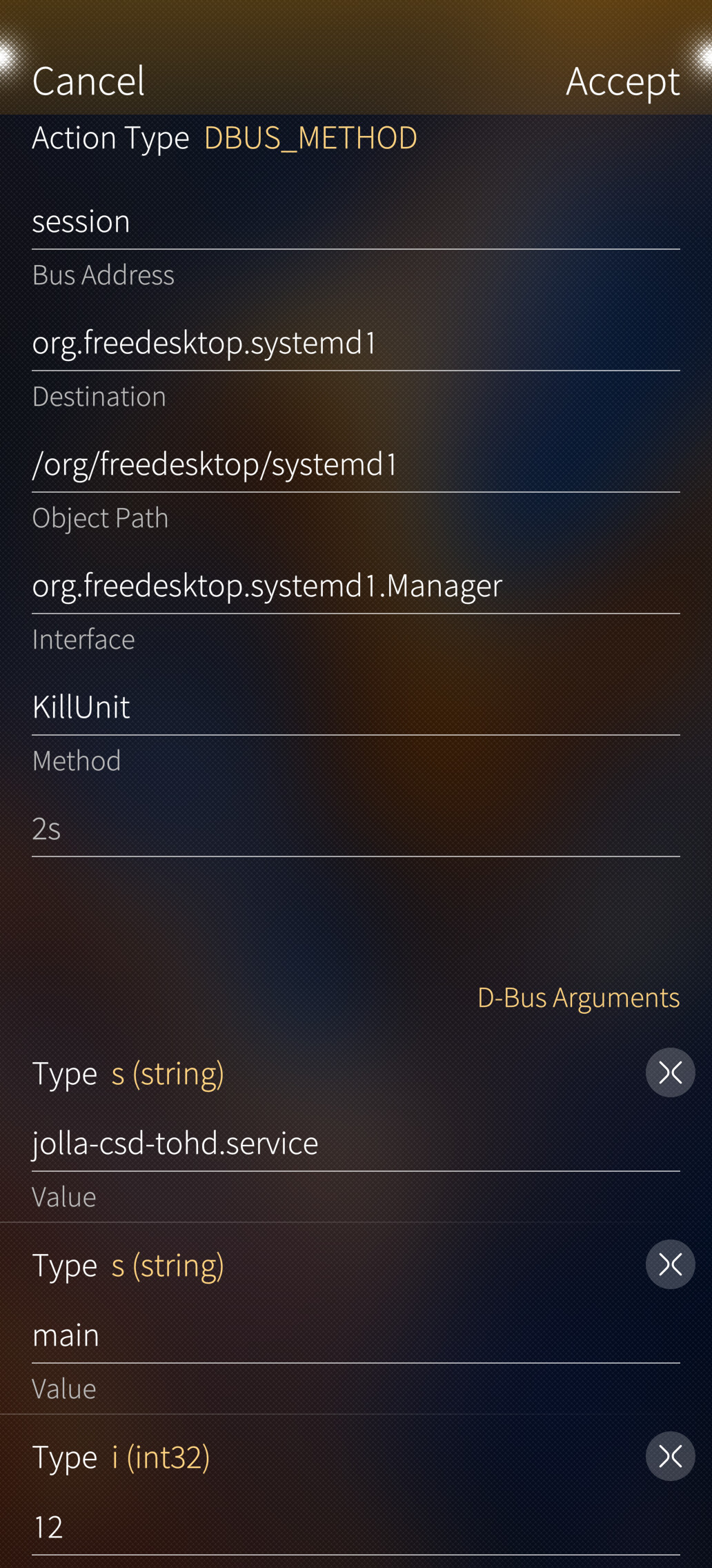
I couldn’t find the toggle toh led action in the community library, if anyone else also can’t find it I quickly made my own. I couldn’t find a way of entering a parameter string in an int32 dbus argument, so for the enable variant you have to duplicate it and change the signal from 12 to 10:
It has been superseded by the example under claudeshannon/Privacy Switch + Inari Blue TOH LED which directly uses i2c to talk to the LED driver inside the TOH.