Simple, elegant, working.
Fantastic, many thanks @ckonte !
1 Like
There is one, right?
I released Owlfish v1.5.0 with support for display hardware on Xperia phones (the Jolla Phone already had support for it since 1.2.0). This means that performance is much better because it doesn’t use the GPU, nearly zero overhead, but it requires the installation of an additional package because it needs a process running as “graphics” (no root permissions needed).
I tested it on the Xperia 10iii, but it should work on other similar phones too, including some non-sony Qualcomm based devices.
See release on GH: Release Owlfish 1.5.0 · ccontino84/owlfish · GitHub
Or Openrepos: Owlfish | OpenRepos.net — Community Repository System
With addon for Xperia phones: owlfish-qualcomm | OpenRepos.net — Community Repository System
9 Likes
I never wanted to use any nightshift-like software on SFOS because of their inferior method (overlay). But this convinces me.
So owlfish-qualcomm is automatically used when installed - and on suitable devices I guess?
Now I just have to reboot my phone to see it in action… edit: a Home screen restart seems to be enough
Your assumption is correct, the qualcomm process runs a probe on start and keep running only on supported devices. Owlfish uses it automatically when it’s running, otherwise it falls back to the GPU. Nothing changes for the Jolla Phone using Mediatek’s display hardware.
Thanks for this! It makes the screen of the Jolla Phone so much better. Would it be possible to have settings for day and night? I would like to have the saturation always at around 80% and a bit warmer tone during day as well. The phone is a bit oversaturated and cool by default.
Technically yes, it’s possible. I have to see how that could fit in the settings page but I can take a look
I think I found a nice way to achieve what you asked for:
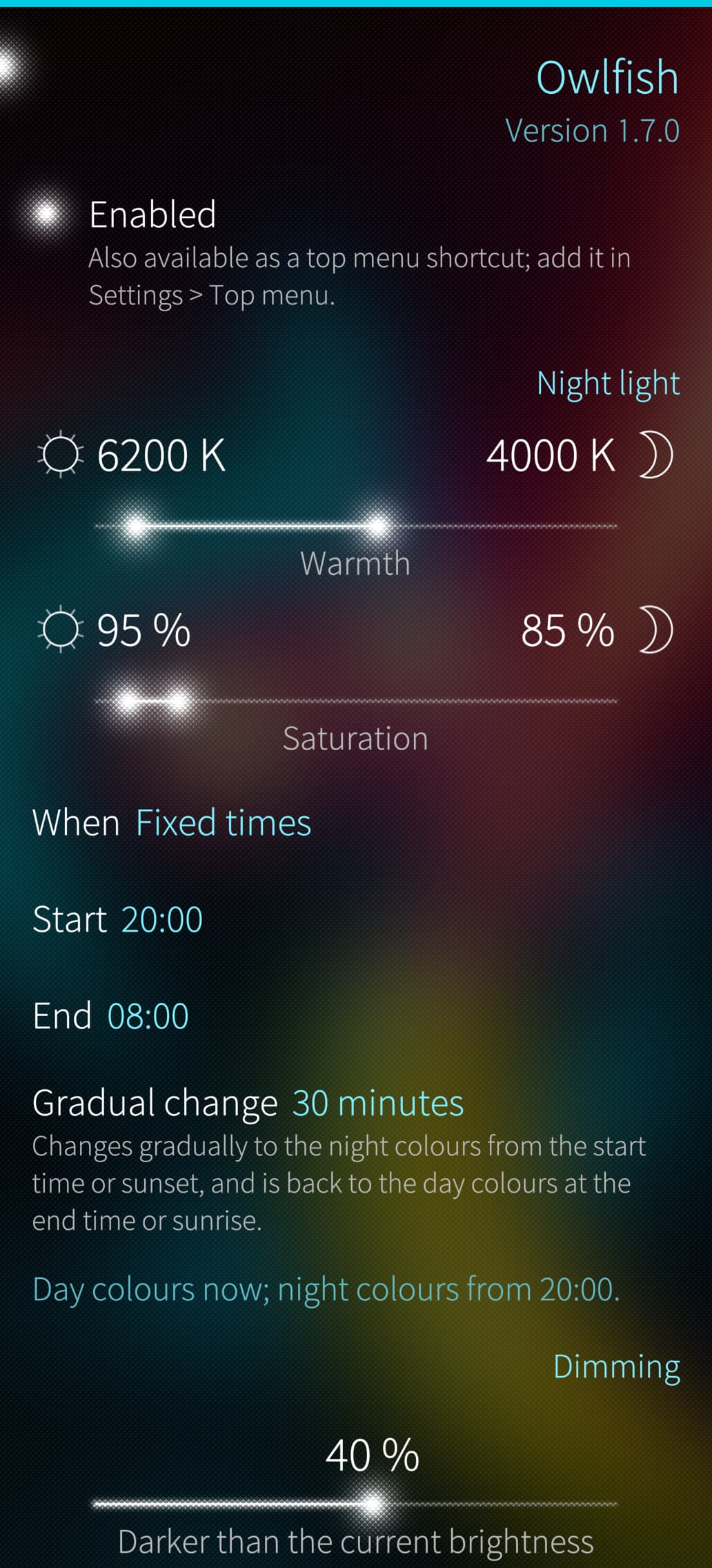
Release 1.7.0 is out with day/night settings and live previews, 1.6.0 wasn’t announced because I was waiting for Openrepos to restore the operations, but it will take a few more days apparently.
So here are the changes from both releases, available from Github only for now:
1.7.0
Night light with a schedule now has a day value and a night value for Warmth and Saturation: each slider gets two handles, the day’s (sun) on the left and the night’s (moon) on the right, and the colour changes gradually between them. For example, a slight warmth all day and a strong one at night. The day values start at no change, so nothing changes until you move them.
Saturation now runs from 100 % on the left to grey on the right, like Warmth: on both sliders, further right means more filter.
Preview: while your finger rests on a Warmth, Saturation or Dimming slider, the screen shows that value now, whatever the time, the light or the Enabled switch, and goes back when you let go.
1.6.0
The settings page is now in English, German, Spanish, French and Italian, following the phone’s language. Report a wrong or clumsy translation as a bug.
Works side by side with other home screen add-ons, such as Frogfish: Owlfish now starts through a small shared loader, so the add-ons no longer compete for the same setting.
6 Likes
That was fast! And what an awesome way to implement this. Thanks a lot!
1 Like