Today I received my new Jolla Phone, and i’m setting everything UP.
Anyway I was trying several maps apps, and apparently none of them is able to get precise location.
I tried Waze, and Pure Maps, and both of them show no sign of location service. Waze shows me a warning telling me that there is no location. Pure Maps, when I select “Current Location” it is stuck in the loading status.
Tried GPSInfo, and satellite in use is always 0/2.
Is anyone having the same issue? I’m running SFOS 5.20.22
I have location services enabled, and the highest precision settings “High accuracy” selected.
I’m still learning to get best of GPS on SfOS. After rebooting my phone, it seems I need to go outside for a few minute(s) to get the first fix. After that it usually seems able to get a fix indoors, even after not being used for while.
Being by a window doesn’t seem enough for the first fix. Nor does leaving it running for hours inside.
Inside near the window 9 of 47, resolution ± 20m in high accuracy mode - before reboot.
Switched to satellite only mode and after a complete phone restart , it took a minute then GPSInfo says 14/48, resolution ± 20m. Everything in the building in room with some windows.
Well why what …
How good would the spatial resolution in satellite only location mode in relation to high-resolution mode with the JP2026 have to be according to your experience?
During a walk through the city it was really good today with hardly cloudy weather in between.
In satellite-only mode, navigation was possible with Pure Maps to exact the house at the streets or path in the park, even with the mobile network switched off.
When I turn on Pure Maps again here at home in the building, the position pointer comes up to the grounds in front of the house.
I would be very happy if it stayed that way. I can’t say that I have any idea what I could have effectively influenced.
Joining in the conversation to echo @bromojoll ‘s experience, as somebody transferring over from an Apple device, it’s a new experience to not be able to lock onto a location while planning any sort of route or search while indoors. It does make me wonder how Apple/Android does it. Acknowledging the privacy angle however, it would be a great feature if the phone remembered the last position that was found while a GPS connection was made, and offered that to maps apps, perhaps only as an option if that was concerning for some people.
A separate concern, but it would also be great if you could save certain common positions in Pure Maps, such as Home / Office, i.e. the places you’re most likely to be inside of when searching for anything. Finally, does anyone know of any documentation that says anything about the various APIs offered in Pure Maps that might allow one to search for venues (and how to use them)? I tried Foursquare but that doesn’t appear to result in any venues appearing in my country when I do a search e.g. for type “Restaurant”. All tips very welcome (and forgive me if this is considered tangential to the thread).
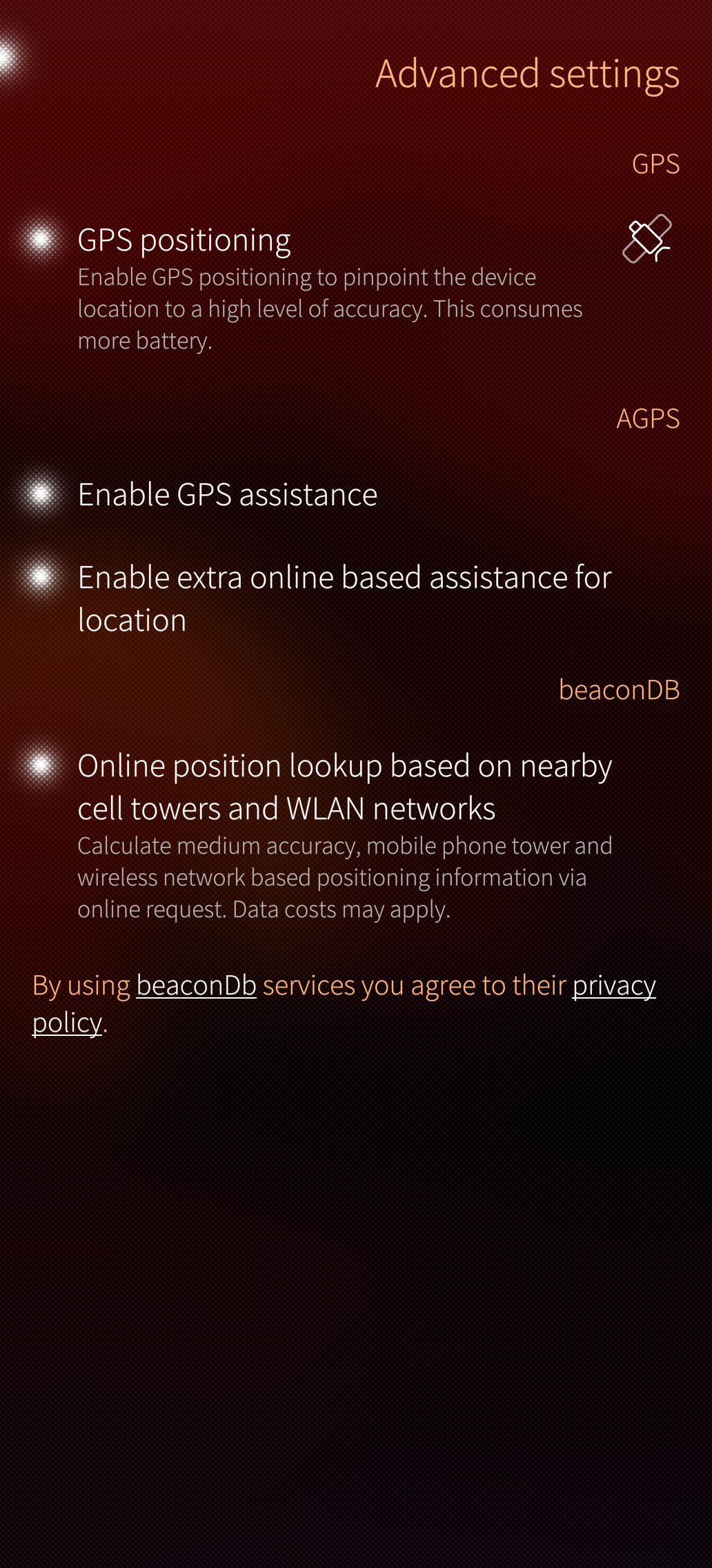
Did you activate the BeaconDB in your GPS-Settings? That should help for your first problem. If it doesnt help, than it would be great if you collect the beacons with the App StumbleFish.
In Pure Maps you can save places as Bookmarks and rename place (Home, Work etc.) So I cannot see a problem there. My Jolla 2026 gained position with GPSInfo in 6 seconds in my living room not close to windows and under steel roof. I know that the first position fix can be hard, but gets better very quickly.
Thank you, I hadn’t thought to look into the Custom settings, I suppose I thought “High-accuracy positioning” was as good as it got! Turning on the option under beaconDB does seem to have solved the problem.
Yes I can save bookmarks, but they are not listed when selecting a From/To location in the Navigation section, or the Near section of the Nearby Venues section. You can only get there by starting to type the name of one of your bookmarks. A random selection of previous searches is listed, though it doesn’t relate to the most recent searches, just a couple of historical ones.
As mentioned above, indoor location seems solved with beaconDB access enabled
I’m having another issue with GPS. So Pure Maps kind of work when outside, from the inside it can´t even connect to satellites (And i’m even close to the window), but that is not the main issue, the problem is Waze. Apparently it is having problems with getting GPS connection. EVen when GPSInfo show full connection from outside, waze apparently can get GPS location only when started, but it lost it after few seconds.
I checked location settings both on waze and from settring and everything is granted, enabled.
Is anyone having this issue? Or is just me?
I’ve searched the forum, and I wasn´t able to find any post for this issue. Apologies if there was one already, please just link it.
A bit frustrated that JP2 doesn’t receive GPS signal inside while other smartphones (my work iPhone and Pixel) can hold the locations. When I am outside, Google Maps recognise the location but somehow Pure map doesn’t…
I must say it’s not evident that the correct set-up is hidden behind a button “Custom settings”.
I’m not sure whether the AGPS option does anything, but overall I’m happy with the speed to lock the position.
The position may be “pretty good” at first. Some apps handle this differently than others. Some, especially android, only work with fixed coordinates only. Others are happy with the pretty good version, it seems.